- 3D Browser
- 軟體版本 : 5.1 中文化
- 軟體分類 : 17中文化軟體 (數字開頭)
- 語言介面 : 繁體中文
- 作業系統 : Windows(10以下)
- 軟體性質 : 免費軟體
- 使用限制 : 非商業使用
- 檔案大小 : 539 KB
- 官方網站 : Manuel Jouglet
- 點閱次數 : 20,357下載次數 : 2,166
- 更新時間 : 2002/10/24 下午 04:16:44
軟體簡介
3D Browser - 可以讀寫 2D/3D 圖檔的秀圖軟體,支援 3DS、MAX..等 3D 及 2D,超過 60 種的檔案格式,可以批量重新命名、在圖片加入符號或關鍵字,還有快速剪裁、旋轉、使用濾鏡、循序播放、3D 圖片轉檔..等功能。
說明介紹
3D Browser 可以讀/寫下列 2D 檔案格式: 類型│說明│附註 ANI│Windows animated cursor file AVI│Audio/Video Interleave image file AVS│AVS X image file BMP│Microsoft Windows bitmap image file CGM│Computer Graphics Metafile CMYK│Raw cyan, magenta, yellow, and black samples CUR│Windows cursor file DCM│Digital Imaging and Communications in Medicine image file format │唯讀 DCX│ZSoft IBM PC multi-page Paintbrush file DEI│Defocus Dei ZBuffer file│唯讀 DIB│Microsoft Windows bitmap image file DPX│Digital Moving Picture Exchange EPDF│Encapsulated Portable Document Format│唯寫 EPI│Adobe Encapsulated PostScript Interchange format│唯寫 EPS│Adobe Encapsulated PostScript file│唯寫 EPS2│Adobe Level II Encapsulated PostScript file│唯寫 EPSF│Adobe Encapsulated PostScript file│唯寫 EPSI│Adobe Encapsulated PostScript Interchange format│唯寫 EPT│Adobe Encapsulated PostScript Interchange format with TIFF preview │唯寫 FAX│Group 3 FITS│Flexible Image Transport System FPX│FlashPix Format│唯讀 GIF│CompuServe graphics interchange format GIF87│CompuServe graphics interchange format GRAY│Raw gray samples│唯寫 HDF│Hierarchical Data Format ICO│Microsoft icon│唯讀 IFF│Interlaced File Format JBIG│Joint Bi-level Image experts Group file interchange format JP2│JPEG-2000 JP2 File Format Syntax JPC│JPEG-2000 Code Stream Syntax JPEG│Joint Photographic Experts Group JFIF format MNG│Multiple-image Network Graphics MPEG│Motion Picture Experts Group file interchange format│唯讀 M2V│Motion Picture Experts Group file interchange format (version 2) │唯讀 MTV│MTV Raytracing image format OTB│On-the-air Bitmap PBM│Portable bitmap format (black and white) PCD│Photo CD PCDS│Photo CD PCX│ZSoft IBM PC Paintbrush file PGM│Portable graymap format (gray scale) PIC│Pic Softimage file│唯讀 PICT│Apple Macintosh QuickDraw/PICT file PIX│Alias/Wavefront RLE image format│唯讀 PNG│Portable Network Graphics PNM│Portable anymap PPM│Portable pixmap format (color) PS│Adobe PostScript file PSD│Adobe Photoshop bitmap file PS2│Adobe Level II PostScript file PTIF│Pyramid encoded TIFF PWP│Seattle File Works multi-image file P7│Xv's visual schnauzer format RGB│Raw red, green, and blue samples│唯寫 RGBA│Raw red, green, blue, and matte samples│唯寫 RLA│Alias/Wavefront image file│唯讀 RLE│Utah Run length encoded image file│唯讀 SCT│Scitex Continuous Tone Picture image file SGI│Irix RGB image file SUN│SUN Rasterfile TGA│Tuevision Targa image file TIFF│Tagged Image File Format TIM│PSX TIM file│唯讀 TTF│TrueType font file UYVY│Interleaved YUV│唯寫 VICAR│VICAR raster file│唯讀 VIFF│Khoros Visualization image file WBMP│Wireless bitmap image file│support for uncompressed monochrome only WPG│Word Perfect Graphic XPM│X Windows system pixmap file (color) YUV│CCIR 601 4:1:1 file│唯寫 ZPIC│ZPIC Softimage file│唯讀 3D Browser 可以讀/寫下列 3D 檔案格式: 類型│說明│附註 3DS│3D Studio file│唯讀 A3D│Amapi file│唯讀 COB│Truespace object│唯讀 LW│Lightwave object LWB│Lightwave object LWM│Lightwave object LWO│Lightwave object MA│Maya scene│唯寫 MAX│3DS Max file│Using the plugin 3D Browser for 3DS Max SCN│Truespace scene│唯讀 X│Amapi file│唯讀
版本說明
x64/x86_64 : 64 位元x32/x86/i386 : 32 位元amd64 : Intel/AMD 64 位元arm64/aarch64 : arm 64 位元安裝版 : 軟體需經過安裝程序才可執行免安裝版/可攜式版 : 軟體不需安裝即可執行
圖片參考
圖片來源 : www.mootools.com

網編推薦.

多語 Portable Apps 30.1
功能齊全的可攜式軟體系統,它將所有可攜式應用程式捆綁在一起,並允許您構建自己的自定義可攜式應用程式套件。
此軟體所下載安裝的軟體是與你自己電腦上的應用程式軟體分開儲存的。
超過 400 種真正的可攜式應用程式(44GB!),多達 9 個頻道,20 個語言包,40 個子應用程式分類,9.95 億次下載,免費,合法,安全和完全可攜式的 No Shovelware。沒有捆綁軟體。
最新焦點

多語 CrystalDiskInfo 9.9.1 安裝版 Standard Edition
透過硬碟本身 S.M.A.R.T. 檢測我們的硬碟是否有異常。
網編推薦.
多語 Files 4.1.0 for Windows App-Installer
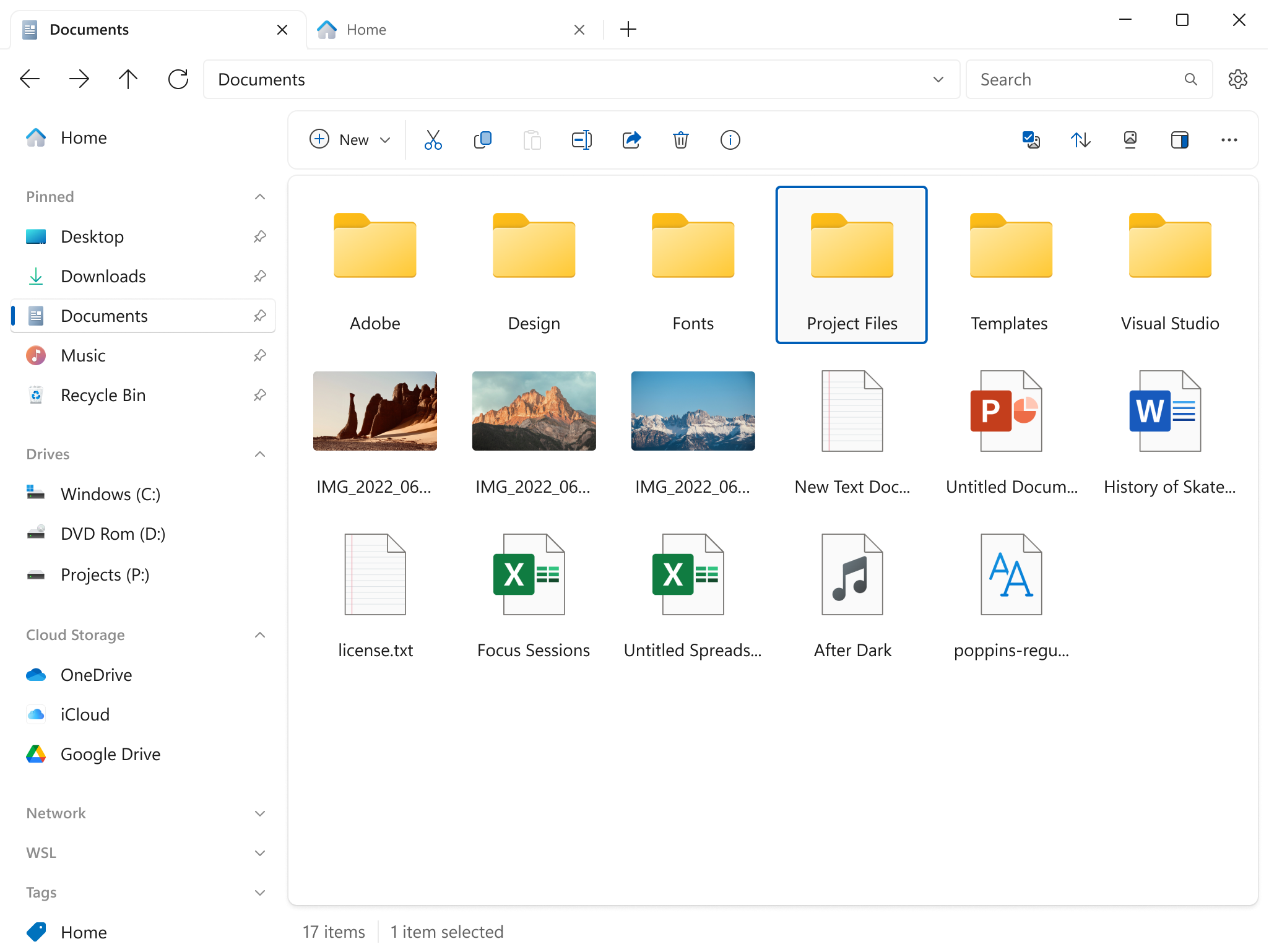
Files 是一款適用於 Windows 的檔案管理器,具有強大而直觀的設計,它具有多個選項卡、窗格、列、上下文選單和標籤中的shell擴展等功能。
磁碟機部分列出了所有可用的存儲設備,並顯示可用空間量以及總容量。
您瀏覽的檔案顯示在「最近的項目」下,您可以右鍵點擊某個項目以將其從列表中刪除或清除整個列表。
窗格頂部的工具欄類似於 Web 瀏覽器的導航控件。它有 4 個選項後退、前進、上一級和刷新。